
Mercedes Digital Cockpit: Ultimate Luxury & Performance
The Mercedes-Benz Digital Cockpit is a sophisticated dashboard display that combines advanced technology with luxurious design, offering drivers an immersive and intuitive experience. It enhances both the performance feel and the overall driving pleasure through customizable screens, seamless connectivity, and intuitive controls, truly embodying the pinnacle of automotive luxury and innovation.
Imagine stepping into your Mercedes-Benz. Instead of traditional dials and gauges, you’re greeted by a vibrant, high-resolution display that flows seamlessly across your dashboard. This is the Mercedes-Benz Digital Cockpit, a revolutionary system that redefines how you interact with your car. It’s more than just a screen; it’s your command center, blending cutting-edge technology with the signature luxury and performance you expect from Mercedes-Benz.
Owning a Mercedes-Benz is about experiencing the best. The Digital Cockpit is a key part of that experience, offering a level of customization and clarity that makes every drive more engaging. It presents driving data, navigation, entertainment, and vehicle information in a visually stunning and easy-to-understand format. Whether you’re a seasoned Mercedes-Benz driver or new to the brand, understanding this advanced system will unlock its full potential and enhance your driving pleasure.
This guide will walk you through everything you need to know about the Mercedes-Benz Digital Cockpit. We’ll explore its features, how to customize it, and what makes it a standout piece of automotive technology. Get ready to discover a more connected, luxurious, and thrilling way to drive.
Understanding the Mercedes-Benz Digital Cockpit

The Mercedes-Benz Digital Cockpit, officially known as the MBUX (Mercedes-Benz User Experience) system, is an intelligent and adaptive digital instrument cluster designed to enhance the driver’s experience. It replaces the traditional analog gauges with a fully digital display, offering unparalleled flexibility and a futuristic aesthetic. This advanced system represents a significant leap in automotive interior design and functionality, setting new benchmarks in the luxury car segment.
At its core, the Digital Cockpit is about providing information in a way that is not only efficient but also aesthetically pleasing. It’s engineered to be intuitive, meaning you can access complex information with simple gestures or voice commands, keeping your focus on the road. This technology is a hallmark of Mercedes-Benz’s commitment to innovation, seamlessly integrating driver assistance systems, infotainment, and vehicle diagnostics into one cohesive interface.
What is MBUX?
MBUX is the overarching infotainment system from Mercedes-Benz, and the Digital Cockpit is its visual centerpiece. Introduced a few years ago, MBUX stands for Mercedes-Benz User Experience. It’s designed to “learn” and adapt to the user, offering personalized content and functions. This system is built with artificial intelligence (AI) and features a voice assistant that can be activated by saying “Hey Mercedes.” The goal of MBUX is to create a strong bond between the car and the driver, making the vehicle feel more personal and responsive.
Key Components of the Digital Cockpit
The Digital Cockpit typically consists of two large, high-definition screens that are seamlessly integrated into a single unit, often referred to as the “widescreen cockpit.”
- Digital Instrument Cluster: This is the screen directly in front of the driver, replacing traditional analog gauges. It can display a variety of information, including speed, RPM, fuel levels, and trip data, but also much more, such as navigation maps and driver assistance system status.
- Central Media Display: This screen, usually positioned to the right of the instrument cluster, is primarily for infotainment functions. It controls features like navigation, audio, climate control, and vehicle settings.
These screens work in harmony, allowing for a fluid transfer of information. For instance, navigation instructions from the central display can be mirrored or expanded within the instrument cluster for easier viewing.
Design Philosophy: Luxury and Intuition
Mercedes-Benz has meticulously crafted the Digital Cockpit to embody its core principles of luxury and intuitive design. The graphics are sharp, vibrant, and animated with a premium feel. The user interface is clean and uncluttered, reducing cognitive load on the driver. This design philosophy ensures that while the technology is advanced, it never feels overwhelming. Instead, it enhances the sense of occasion and control that is synonymous with driving a Mercedes-Benz.
Exploring the Features and Customization
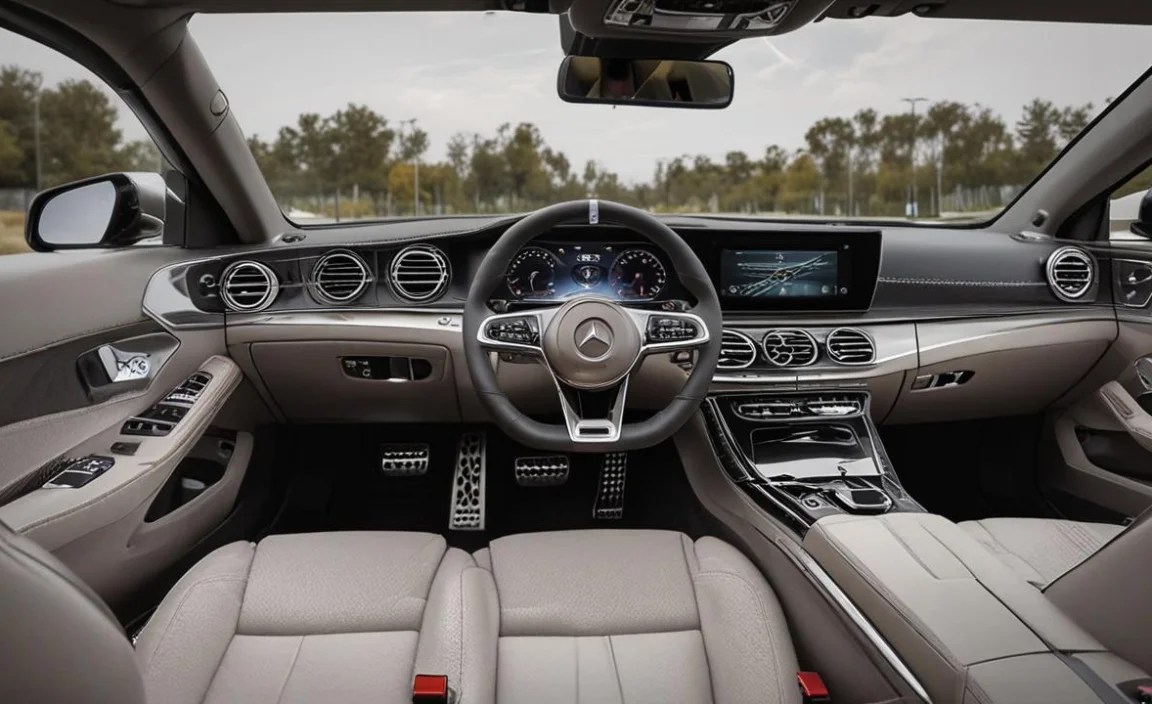
One of the most compelling aspects of the Mercedes-Benz Digital Cockpit is its high degree of customization. Drivers can tailor the display to suit their preferences, prioritizing the information they deem most important for their driving experience. This flexibility makes each Mercedes-Benz feel uniquely personal.
Display Styles and Themes
The Digital Cockpit offers several predefined display styles that dramatically alter the look and feel of the screens. These styles are designed to cater to different driving moods and priorities:
- Classic: This style aims to retain a more traditional aesthetic, often with circular elements resembling analog gauges, but rendered digitally. It’s familiar and straightforward.
- Sport: This theme usually features a red or darker color palette, with performance-oriented readouts like a central rev counter, power output meters, and staggered gear indicators becoming more prominent.
- Progressive: This is a more modern and futuristic option, often using abstract graphics and streamlined layouts to convey information efficiently.
- Navigation-focused: Some themes place a significant emphasis on the navigation map, integrating it more deeply into the instrument cluster for a truly immersive guiding experience.
Beyond these core styles, many models offer further customization within each theme, allowing you to choose which specific data points appear on your preferred screen layout.
Personalizing Content
The real magic lies in the ability to select and arrange the content displayed on the Digital Cockpit. Using the touch-sensitive controls on the steering wheel or the central touchpad, you can configure individual screen areas, known as “virtual widgets,” to show precisely what you want.
Common widgets include:
- Navigation: Full-screen maps, turn-by-turn directions, or proximity alerts for points of interest.
- Infotainment: Current media playing (radio station, song, podcast), album art.
- Vehicle Status: Tire pressure, oil level, coolant temperature.
- Driver Assistance: Status of systems like adaptive cruise control, lane keeping assist, and traffic sign recognition.
- Efficiency Data: Fuel consumption, range, eco-driving tips.
- Trip Computer: Detailed statistics for your journeys.
This granular control means you can create a dashboard that perfectly matches your driving style, whether you’re focused on performance metrics, navigating unfamiliar territory, or simply enjoying your music.
Steering Wheel Controls
The multi-function steering wheel is your primary tool for navigating the Digital Cockpit. Mercedes-Benz has thoughtfully designed these controls to be intuitive and accessible without requiring you to remove your hands from the wheel.
- Touchpads: Smaller touch-sensitive pads on the left and right spokes allow you to scroll through menus, select options, and swipe through different display views. Think of them like tiny smartphone trackpads.
- Scroll Wheels/Buttons: Traditional buttons and wheels are also present for quick adjustments, volume control, and answering/ending calls.
By swiping left or right on the steering wheel touchpads, you can cycle through different “classic views” or customizable screen layouts. Swiping up or down often brings up contextual menus or allows for scrolling within a particular widget. A press of the touchpad typically confirms a selection.
Voice Control with “Hey Mercedes”
The MBUX system’s voice assistant is a game-changer for ease of use. By simply saying, “Hey Mercedes,” you can activate the system and issue commands naturally. This goes far beyond basic functions.
Examples of “Hey Mercedes” commands:
- “Hey Mercedes, navigate to the nearest coffee shop.”
- “Hey Mercedes, what’s the weather like today?”
- “Hey Mercedes, play my favorite playlist.”
- “Hey Mercedes, how much fuel is left?”
- “Hey Mercedes, change the cabin temperature to 70 degrees.”
- “Hey Mercedes, show me the sport display.”
The system understands natural language, making it incredibly convenient and safe to operate various functions while keeping your attention on the road. This reduces the need to fiddle with buttons or touchscreens.
Mercedes Digital Cockpit by Model Lineup

The availability and specific configuration of the Digital Cockpit vary across the extensive Mercedes-Benz model range. Entry-level models might feature a smaller single screen, while higher-end and performance-oriented vehicles boast the expansive dual-screen “widescreen cockpit.”
Here’s a general overview of what you might find:
| Model Segment | Typical Digital Cockpit Configuration | Key Features & Considerations |
|---|---|---|
| Compact Cars (A-Class, B-Class, GLA, GLB) | Often feature two digital screens (e.g., 7-inch and 10.25-inch or two 10.25-inch) integrated into a single unit. Some base models might have a more traditional cluster with a central digital screen. | Highly customizable with various themes and widgets. MBUX with “Hey Mercedes” voice control is standard. Excellent integration of navigation and driver assistance. |
| Executive & Luxury Sedans (C-Class, E-Class, S-Class) | Widescreen cockpit (two 12.3-inch displays) is common, especially in higher trims or as an option. The S-Class often features a particularly impressive, driver-focused digital instrument cluster. | Exceptional graphics clarity and smoothness. Advanced driver assistance system visualizations are more detailed. S-Class offers even more sophisticated display options and augmented reality navigation. |
| SUVs (GLC, GLE, GLS) | Similar to sedans, with widescreen cockpits becoming standard or widely available on higher trims. Size and resolution of screens may vary by model and generation. | Designed for versatility, offering off-road information and towing assist features where applicable, alongside standard luxury and performance displays. |
| Coupes & Convertibles (C-Class Coupe/Convertible, E-Class Coupe/Convertible, CLE) | Typically mirrors the sedan counterparts, offering sportier themes and integrated performance data. The focus is on a driver-centric experience. | Emphasis on dynamic driving displays and seamless integration with the vehicle’s sporty character. |
| AMG Performance Models (C43, C63, E53, E63, GT 4-Door, etc.) | Exclusive AMG-specific display modes are a signature feature. These often include dedicated performance meters (G-force, lap timer, engine load), power/torque readouts, and sportier graphics. The widescreen cockpit is standard. | Performance data is prioritized and highly visible. AMG Dynamics controls and specific chassis settings can often be accessed and visualized. Higher resolutions and faster refresh rates are common. External links to authoritative sources like official Mercedes-AMG can provide more specific details on each model’s unique offerings. |
| Electric Vehicles (EQA, EQB, EQC, EQE, EQS) | The EV range often showcases the most advanced MBUX iterations. The EQS, for example, can feature the Hyperscreen – a massive 56-inch curved glass panel encompassing three displays. | Dedicated electric vehicle information is heavily integrated, including charge status, range prediction, charging station locations, and energy flow diagrams. Graphics are often optimized for efficiency and a futuristic feel. |
Navigating Specific Models
When researching a specific Mercedes-Benz model, look for terms like “MBUX,” “Digital Cockpit,” “Widescreen Cockpit,” or “Hyperscreen” in the vehicle’s specifications. The dealership or the Mercedes-Benz USA website’s configurator tool will provide the most accurate information for the model year and trim you are interested in. For older models, the Digital Cockpit might have been an optional upgrade rather than standard.
Performance Enhancements and Driving Modes

The Mercedes-Benz Digital Cockpit isn’t just about displaying information; it actively contributes to the driving experience, especially in AMG models and performance-oriented vehicles. It provides drivers with the tools and feedback necessary to understand and optimize their car’s capabilities.
AMG-Exclusive Displays
For AMG enthusiasts, the Digital Cockpit offers specialized modes that are unavailable on standard models. These modes are designed to highlight the immense power and precise engineering of AMG vehicles:
- AMG Performance Mode: This mode brings performance metrics to the forefront. You might see things like:
- G-Force Meter: Visualizes lateral and longitudinal acceleration during cornering and braking.
- Engine Data: Real-time display of engine load, torque output, and oil temperature.
- Shift Lights: Integrated visual cues to help drivers achieve optimal upshifts at the redline.
- Lap Timer: For track day enthusiasts, a digital timer to record lap times.
- AMG TRACK PACE: This is an even more advanced feature found in some high-performance AMG models. It uses sophisticated algorithms and GPS data to analyze driving style on a racetrack. It can record moments of acceleration, braking, and speed, and even offer driver coaching. This functionality is directly tied to the visual feedback provided by the Digital Cockpit.
These displays transform the cockpit into a data-rich environment, allowing drivers to intimately understand their vehicle’s performance envelope.
Driving Dynamics Control
The Digital Cockpit also provides clear visual feedback on which driving mode your Mercedes-Benz is currently in. Popular systems like:
- DYNAMIC SELECT: Allows drivers to choose between modes like Comfort, Sport, Sport+, Individual, and Slippery. The Digital Cockpit will display the selected mode prominently, often with a change in color scheme or graphic presentation to match the mode’s character.
- AMG DYNAMICS: An enhancement found in AMG models, which offers refined control over the car’s agility and stability. The cockpit will show sub-modes like “Basic,” “Advanced,” “Pro,” and “Master,” indicating the level of electronic stability control intervention and drivetrain responsiveness.
This immediate visual confirmation ensures drivers are always aware of their vehicle’s current setup and how it will affect the driving dynamics.
Driver Assistance Visualization
The Digital Cockpit plays a crucial role in depicting the status of Mercedes-Benz’s advanced driver assistance systems (ADAS). Modern Mercedes vehicles are equipped with sophisticated sensors and cameras that enable features like:
- Active Distance Assist DISTRONIC: Visualizes the set distance to the vehicle ahead.
- Active Steering Assist and Lane Keeping Assist: Shows the detected lane markings and the vehicle’s position within them.
- Traffic Sign Assist and Speed Limit Assist: Clearly displays recognized speed limits and traffic signs directly in your line of sight.
- Blind Spot Assist: Provides visual warnings for vehicles in your blind spots.
These visualizations are often rendered in 3D with clear icons, making it easy to understand at a glance what the car is “seeing” and how it’s reacting. This enhances safety and driver confidence, turning complex technology into intuitive visual cues. To learn more about the science behind these systems, the National Highway Traffic Safety Administration (NHTSA) website offers excellent, unbiased information on advanced driver-assistance technologies.
Technology and Connectivity

The Mercedes-Benz Digital Cockpit is not just a display; it’s a gateway to a connected and integrated automotive experience. MBUX has been designed from the ground up to offer seamless connectivity, intuitive operation, and advanced technological integration.
Seamless Integration of Infotainment
The MBUX system brilliantly integrates all aspects of your vehicle’s infotainment:
- Navigation: Full-screen maps with live traffic updates, satellite imagery, and optional augmented reality overlays (where available) that project directional arrows and street names onto a live camera feed displayed on the central screen or within the instrument cluster.
- Audio: Control of radio, USB media, Bluetooth audio, and integrated streaming services like Spotify. Album art and song information are displayed clearly.
- Communication: Hands-free calling, messaging, and contact management.
- Vehicle Settings: Access to comfort settings, ambient lighting configurations, and advanced vehicle personalization options.
The dual screens allow for a multi-tasking environment. You can have navigation on one screen while controlling your music on the other, or display a comprehensive driving data view on the instrument cluster while using the central screen for other functions.


