
Unlock Mercedes instrument cluster by model Secrets
Mercedes Instrument Cluster by Model: Essential Guide
Your Mercedes’ instrument cluster is its digital heartbeat, evolving from classic analog gauges to advanced widescreen displays. Understanding its unique features by model – from the compact A-Class to the luxurious S-Class or electric EQS – helps you personalize settings, interpret crucial vehicle data, and troubleshoot common issues. Each cluster is meticulously designed for optimal driver engagement and information delivery.
When you settle into the driver’s seat of a Mercedes-Benz, your eyes naturally fall upon the instrument cluster. It’s more than just a speedometer and tachometer; it’s the nerve center of your driving experience, displaying vital information, navigation, and entertainment. Over the years, Mercedes-Benz has consistently pushed the boundaries of automotive technology, transforming this critical interface from traditional dials into stunning, customizable digital landscapes. For many owners, navigating these sophisticated systems can feel a bit daunting at first. But don’t worry. This guide will demystify the Mercedes instrument cluster, breaking down its features and evolution across various models, helping you understand, personalize, and truly connect with your vehicle.

The Evolution of Mercedes-Benz Instrument Clusters
Mercedes-Benz has always been at the forefront of automotive innovation, and the instrument cluster is a prime example. From the elegant simplicity of early analog gauges to today’s expansive digital displays, the journey reflects a commitment to driver information and luxury.
Early Years: Analog Precision
For decades, Mercedes-Benz vehicles featured beautifully crafted analog instrument clusters. These typically included physical needles for speed, RPM, fuel level, and engine temperature, often accompanied by small digital readouts for trip data or mileage. Models like the W124 E-Class or the W202 C-Class exemplified this era, known for their clarity, durability, and understated elegance. The focus was on essential, reliable information presented with timeless design.
The Hybrid Transition: Introducing Digital Elements
As technology advanced, Mercedes-Benz began integrating digital elements into its traditional clusters. This often meant a larger multi-function display (MFD) nestled between analog gauges. This MFD could show navigation directions, audio information, phone calls, and more detailed vehicle settings. You would see this hybrid approach in models from the mid-2000s to the early 2010s, such as the W204 C-Class or the W212 E-Class. It offered the best of both worlds: the familiarity of analog dials with the added versatility of digital information.
The Digital Revolution: Widescreen Cockpit and MBUX
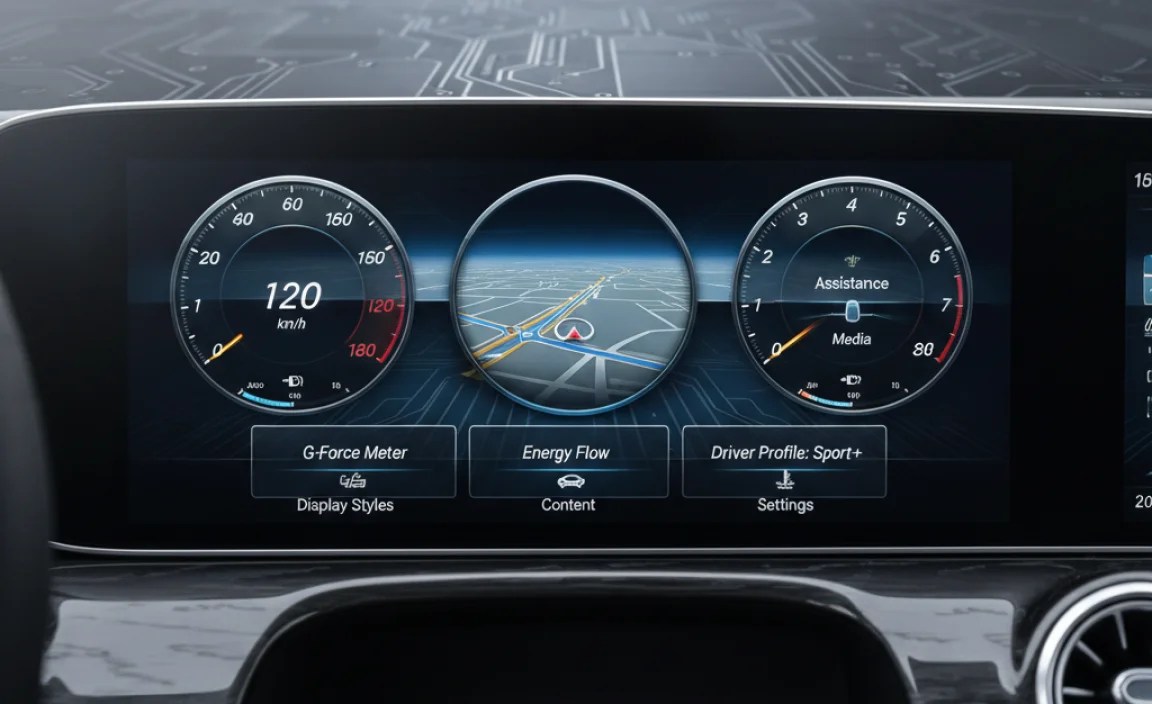
The true paradigm shift arrived with the introduction of fully digital instrument clusters. This began with the “Widescreen Cockpit,” first seen in the W222 S-Class facelift and later in the W213 E-Class. This setup merged the instrument cluster and the central infotainment screen into one seamless, expansive digital display, creating a futuristic, horizontal panel.
This innovation laid the groundwork for the Mercedes-Benz User Experience (MBUX) infotainment system, which brought even greater customization, AI voice assistance, and augmented reality navigation. MBUX is now a cornerstone of nearly all new Mercedes-Benz models, featuring stunning graphics, intuitive menus, and a highly personalized user experience.

Understanding Your Mercedes Instrument Cluster by Model
While the core principles of digital clusters are similar, each Mercedes-Benz model series offers unique nuances and features tailored to its specific audience and segment.
Sedans: A-Class, C-Class, E-Class, S-Class, CLA, CLS
Mercedes-Benz sedans showcase a broad spectrum of instrument cluster technology, reflecting their varying price points and target demographics.
- A-Class (W177), CLA (C118): As entry points to the Mercedes-Benz lineup, these models typically feature a modern, dual-screen setup with two 7-inch displays as standard, or dual 10.25-inch screens as an upgrade. The instrument cluster offers crisp graphics, multiple display styles (Classic, Sport, Progressive), and MBUX integration. It’s highly customizable, allowing drivers to prioritize information like navigation, media, or driver assistance data.
- C-Class (W205 facelift, W206): The W205 facelift introduced a fully digital 12.3-inch instrument cluster as an option, moving away from the hybrid design. The newer W206 generation makes this digital display standard, featuring a free-standing 12.3-inch screen that seamlessly integrates with the central portrait-oriented infotainment display. Customization options are extensive, with various themes and information layouts.
- E-Class (W213, W214): The W213 E-Class was a pioneer, making the Widescreen Cockpit (two 12.3-inch screens) a hallmark feature. This setup provides an immersive experience, offering unparalleled customization and visual fidelity. The latest W214 E-Class refines this with even more sophisticated graphics, often incorporating a “Superscreen” option that extends digital displays across the passenger side.
- S-Class (W222 facelift, W223): The flagship S-Class has always led the way. The W222 facelift brought the Widescreen Cockpit to luxury sedan standards. The current W223 S-Class takes this to another level with a sophisticated 12.3-inch 3D driver display. This innovative screen uses eye-tracking technology to create a genuine three-dimensional effect for the driver without needing special glasses, enhancing depth perception for navigation and alerts.
- CLS (C257): Sharing much of its technology with the E-Class, the CLS also features the impressive Widescreen Cockpit, blending luxury and sporty aesthetics.
SUVs & Crossovers: GLA, GLB, GLC, GLE, GLS, G-Class
Mercedes-Benz SUVs benefit from the same advanced display technology, often with specific readouts useful for varied driving conditions.
- GLA (H247), GLB (X247): Similar to their A-Class sedan counterparts, the GLA and GLB come with dual 7-inch or optional dual 10.25-inch MBUX screens, providing a modern and user-friendly interface. These are practical and stylish for urban adventures.
- GLC (X253 facelift, X254): The X253 facelift introduced an optional 12.3-inch digital instrument cluster. The newer X254 GLC makes a 12.3-inch high-resolution driver display standard, mirroring the C-Class’s advanced setup with vibrant graphics and extensive customization. It also offers specific off-road screens displaying incline, decline, and steering angle.
- GLE (V167), GLS (X167): These larger SUVs, built on similar platforms to the E-Class and S-Class, feature the Widescreen Cockpit (two 12.3-inch screens) as standard. The GLE and GLS offer robust MBUX features, including augmented reality navigation, and can display specific off-road information clearly.
- G-Class (W463): The iconic G-Wagen, while maintaining its rugged exterior, received a thoroughly modern interior update. It now boasts the Widescreen Cockpit (dual 12.3-inch displays), bringing advanced digital interfaces to its legendary off-road capabilities. It also features unique G-Mode displays for hardcore off-roading.
Coupes & Roadsters: SL, SLK, CLE
These models emphasize a driver-focused experience, often with sporty themes and performance-oriented displays.
- SL (R232): The latest generation SL features a sophisticated, driver-angled 12.3-inch digital instrument cluster. This screen is designed to minimize glare and maximize readability, offering various AMG-specific display modes to suit its performance character.
- SLK/SLC (R172): Earlier generations of the SLK (later renamed SLC) primarily featured a hybrid instrument cluster with analog gauges and a central digital display.
- CLE (C236): As a newer model, the CLE integrates the latest Mercedes-Benz digital cockpit technology, similar to the C-Class, with a high-resolution 12.3-inch free-standing digital instrument cluster.
Electric Models: EQA, EQB, EQC, EQE, EQS, EQV
Mercedes MBUX NTG 7 Instrument Cluster | Walkthrough Guide!

Mercedes-Benz’s EQ lineup integrates electric vehicle (EV) specific information seamlessly into their digital clusters, making range, charging, and energy flow intuitive.
- EQA (H247), EQB (X247): These compact EQ models utilize the dual 10.25-inch MBUX screens, customized with EQ-specific displays for charging status, energy consumption, and range optimization.
- EQC (N293): The EQC features two 10.25-inch displays forming the Widescreen Cockpit, adapted for EV driving with dedicated power flow meters and range indicators.
- EQE (V295), EQS (V297): These flagship electric sedans often come with the stunning Hyperscreen as an option (standard on some trims). The Hyperscreen is an expansive, curved glass panel stretching across the entire dashboard, housing three separate displays, including a dedicated 12.3-inch instrument cluster. This integrates advanced EV data, predictive range, and sophisticated energy management visuals. Even without the Hyperscreen, a high-resolution 12.3-inch driver display is standard.
- EQV (447): The electric MPV incorporates a digital instrument cluster adapted for its utility, displaying EV-specific information alongside practical driving data.
AMG Performance Models
AMG models take the digital instrument cluster experience to the next level, with unique themes, performance data, and track-focused displays.
- AMG Hatchbacks (A 45, CLA 45), AMG Sedans (C 63, E 63, S 63), AMG SUVs (G 63, GLE 63), AMG Coupes (AMG GT): Across the AMG lineup, the digital instrument clusters feature exclusive “Supersport” or “Track” display modes. These modes often include a large central tachometer, G-force meters, lap timers, engine data (oil temperature, boost pressure), and shift lights. The graphics are sharper, and the information is prioritized for high-performance driving. The AMG Track Pace feature, integrated into MBUX, can display real-time track data directly on the cluster.
Key Features and Customization
Modern Mercedes-Benz instrument clusters are highly adaptable, allowing drivers to tailor the information and aesthetics to their preferences.
Display Modes and Styles
Most digital clusters offer several pre-set display styles:
- Classic: Mimics traditional analog gauges, offering a familiar look with a modern digital twist.
- Sport: Often features a prominent central tachometer, red accents, and a more dynamic layout.
- Progressive/Modern: Emphasizes minimalism, focusing on key information with clean lines and often a more futuristic appearance.
- Understated: Reduces the amount of displayed information to the absolute essentials for a less distracting experience.
- AMG-Specific (Supersport, Track): Exclusively for AMG models, these modes prioritize performance data, G-meter, lap timers, and shift indicators.
Drivers can switch between these modes using steering wheel controls or the central infotainment screen. Some models also allow for custom configuration of specific zones within the cluster.
Information Displayed
The digital cluster can present a wealth of information, often simultaneously or switchable:
- Driving Data: Speed, RPM, fuel/charge level, engine/motor temperature, range, gear selection.
- Navigation: Turn-by-turn directions, map views, augmented reality overlays (in select models).
- Media: Current song, radio station, album art.
- Driver Assistance Systems: Lane keeping assist, adaptive cruise control status, traffic sign assist.
- Trip Computer: Fuel economy, average speed, journey time.
- Vehicle Status: Tire pressure, oil life, service indicators.
MBUX Integration and Voice Control
The integration of MBUX means that many functions of the instrument cluster can be controlled via the central touchscreen, the touchpads on the steering wheel, or even voice commands using “Hey Mercedes.” This allows for seamless interaction without taking your hands off the wheel or eyes too far from the road. For more on MBUX, visit the official Mercedes-Benz MBUX page.
Steering Wheel Controls
Modern Mercedes-Benz steering wheels feature intuitive touch control buttons or small touchpads that allow you to navigate through the instrument cluster menus, change display styles, access vehicle settings, and control media or phone functions, all without diverting your attention significantly.

Common Issues and Troubleshooting
Even with advanced technology, digital instrument clusters can occasionally encounter minor glitches. Here’s how to address some common issues.
| Issue | Common Causes | Troubleshooting Steps |
|---|---|---|
| Blank or Black Screen | Software glitch, loose connection, blown fuse, severe battery drain. |
|
| Flickering or Intermittent Display | Software bug, loose wiring, electromagnetic interference, failing display unit. |
|
| Incorrect Readings (Speed, Fuel, Temp) | Sensor malfunction, software error, wiring issue. |
|
| Dead Pixels or Lines on Display | Physical damage to the LCD panel, manufacturing defect. |
|
| Frozen or Unresponsive Screen | Software crash, temporary system overload. |
|
For more complex issues, always refer to your Mercedes-Benz owner’s manual or consult a certified Mercedes-Benz technician. You can often find your specific model’s manual on the official Mercedes-Benz USA Owners Manuals portal.

Maintenance and Care
Keeping your instrument cluster in top condition involves simple care.
- Cleaning: Use a soft, lint-free microfiber cloth specifically designed for electronics. Dampen it lightly with a screen cleaner or distilled water (never spray directly onto the screen). Avoid harsh chemicals, abrasive materials, or paper towels that can scratch the delicate surface.
- Software Updates: Ensure your MBUX system and associated software are always up to date. Mercedes-Benz regularly releases updates that can improve performance, add features, and fix bugs. These can often be performed over-the-air (OTA) or by a dealership.
- Protection: While not strictly necessary, some owners choose to apply a screen protector to their instrument clusters, especially if they are prone to accidental scratches.
The Future of Mercedes Instrument Clusters
The journey of the Mercedes-Benz instrument cluster is far from over. We can anticipate even more immersive and intuitive technologies:
- Augmented Reality Everywhere: Expect more widespread integration of augmented reality (AR) beyond navigation, potentially overlaying information directly onto the road ahead through advanced head-up displays or even the instrument cluster itself.
- Advanced AI Integration: Further evolution of AI to anticipate driver needs, personalize information, and reduce cognitive load, making the cluster even more proactive and helpful.
- Haptic Feedback: The possibility of haptic feedback within touch controls or even the display itself, providing tactile confirmation of interactions.
- Seamless Connectivity: Even deeper integration with smart home devices, personal calendars, and other digital ecosystems, making your car an extension of your connected life.
Frequently Asked Questions About Mercedes Instrument Clusters
What is MBUX, and how does it relate to the instrument cluster?
MBUX (Mercedes-Benz User Experience) is Mercedes-Benz’s advanced infotainment system. It directly controls and integrates with the digital instrument cluster, allowing you to customize its display, access navigation, media, and vehicle settings, often using touch, voice commands, or steering wheel controls.
Can I change the display style of my digital instrument cluster?
Yes, most modern Mercedes-Benz digital instrument clusters offer several display styles (e.g., Classic, Sport, Progressive, Understated, AMG-specific). You can typically switch between these using the steering wheel controls or through the MBUX central screen.
My instrument cluster screen is black. What should I do?
First, try restarting your vehicle completely. If it remains black, check the relevant fuses (consult your owner’s manual). Ensure your car battery is not critically low. If the issue persists, it’s best to contact a Mercedes-Benz service center for diagnosis.
Is it possible to upgrade my older Mercedes with a digital instrument cluster?
Generally, a full digital instrument cluster upgrade for an older Mercedes model (that originally came with analog or hybrid gauges) is not a simple plug-and-play process. It often involves complex wiring, software integration, and coding, making it a very costly and often impractical modification. It’s usually not supported by Mercedes-Benz.
Why do AMG models have different instrument cluster displays?
AMG models feature unique “Supersport” or “Track” display modes designed to prioritize performance-oriented information. These include large central tachometers, G-force meters, lap timers, and specific engine data, catering to the enthusiast driver’s needs for high-performance driving.
How do I clean my Mercedes instrument cluster screen?
Use a clean, soft, lint-free microfiber cloth. You can dampen it very slightly with distilled water or a specialized screen cleaner. Gently wipe the screen. Never spray liquid directly onto the screen, and avoid harsh chemicals or abrasive materials.
What is the “Widescreen Cockpit”?
The “Widescreen Cockpit” is a design concept where the digital instrument cluster and the central infotainment screen are housed under a single, seamless glass panel, creating a broad, horizontal display across the dashboard. It was popularized by the E-Class and S-Class and now features across many Mercedes models.
Conclusion
The Mercedes-Benz instrument cluster has evolved into a marvel of automotive technology, transforming from functional gauges into highly personalized digital interfaces. Whether you drive a spirited A-Class, a luxurious S-Class, a rugged G-Wagen, or an electric EQS, understanding the nuances of your specific model’s display is key to maximizing your driving pleasure and staying informed. From customizing display themes and interpreting vital vehicle data to knowing basic troubleshooting steps, a deeper familiarity with your instrument cluster empowers you to truly connect with your Mercedes-Benz. As technology continues its relentless march forward, we can only anticipate even more breathtaking innovations that will continue to redefine the cockpit experience, keeping Mercedes-Benz at the pinnacle of automotive luxury and intelligence.
Mercedes Instrument Cluster by Model: Essential Guide


