
Mercedes SUV Virtual Cockpit: Stunning, Essential
Get ready to transform your Mercedes SUV driving experience with the stunning and essential Virtual Cockpit. This intuitive digital display puts crucial information, navigation, and entertainment right in front of you, making every drive safer and more enjoyable. Learn how to master its features with this simple guide.
Ever felt overwhelmed by complex dashboards or struggled to find the information you need while driving your Mercedes SUV? You’re not alone. Many drivers find the array of buttons and screens in modern luxury vehicles a bit daunting. But what if your car could present all that information – from navigation to entertainment – in one clear, beautiful, and highly customizable display? That’s precisely the magic of the Mercedes-Benz Virtual Cockpit, a revolutionary feature that’s quickly becoming a must-have in their SUV lineup. It’s designed to be both a showstopper and an indispensable driving partner. We’ll break down exactly what it is and how you can make the most of it, turning your daily commute into a more informed and exhilarating journey.
What is the Mercedes SUV Virtual Cockpit?

The Mercedes-Benz Virtual Cockpit, officially known as the MBUX (Mercedes-Benz User Experience) infotainment system’s digital instrument cluster, is a fully digital display that replaces the traditional analog dials and gauges found in older cars. Instead of physical needles and fixed readouts, you get a high-resolution screen that can dynamically change to show you exactly what you want, when you want it. Think of it as a customizable command center for your drive, seamlessly integrated into the dashboard of your Mercedes SUV.
This isn’t just about digital looks; it’s about intelligent design. The MBUX system learns your habits and preferences, predicting what you might want to see or do next. This adaptive learning is a significant part of why the Virtual Cockpit feels so intuitive and essential for the modern driver. It’s a significant leap forward in how we interact with our vehicles, offering an experience that is both luxurious and remarkably practical.
Key Benefits of the Virtual Cockpit
- Enhanced Clarity: Information is presented in sharp, clear graphics, reducing eye strain and making it easier to digest quickly.
- Customization: You can tailor the display to show your preferred information, whether it’s navigation maps, vehicle performance data, media controls, or assistance systems.
- Intuitive Interaction: Controls are typically managed through the steering wheel buttons, touchpads, or voice commands, keeping your hands on the wheel and eyes on the road.
- Modern Aesthetics: The sleek, all-digital look adds a futuristic and premium feel to the car’s interior.
- Advanced Navigation: Full-screen map views with real-time traffic updates and augmented reality overlays (on some models) make navigating new routes a breeze.
Understanding the MBUX System

The Virtual Cockpit is a core component of the MBUX system, which powers the infotainment, communication, and control functions in most new Mercedes-Benz vehicles. MBUX is designed to be more natural and easier to use than ever before. It’s built around two main screens: the central infotainment display and the digital instrument cluster (the Virtual Cockpit). These screens work together to provide a cohesive and immersive experience.
At its heart, MBUX is designed around the principle of “intelligent interaction.” This means it offers multiple ways to control its features, catering to different driver preferences:
1. Touchscreen Controls: The central display is a responsive touchscreen, allowing for direct interaction with menus, navigation, and entertainment options.
2. Steering Wheel Controls: Touch-sensitive buttons and scroll wheels on the steering wheel allow you to navigate menus, select information for the Virtual Cockpit, and control various vehicle functions without taking your hands far from the wheel.
3. Voice Control: This is where MBUX truly shines. By simply saying “Hey Mercedes,” you can activate the voice assistant to perform a wide range of tasks. You can ask for directions, change the radio station, adjust the climate control, find points of interest, or even inquire about the car’s status (“Hey Mercedes, what’s my tire pressure?”). The system understands natural language, making it incredibly convenient.
4. Touchpad (Center Console): In some configurations, a touchpad on the center console can also be used to navigate the infotainment system, offering another tactile method of control.
Navigating Your Virtual Cockpit: A Beginner’s Guide

The Virtual Cockpit is designed for ease of use, but like any advanced technology, a little guidance can go a long way. The primary way you’ll interact with and customize your Virtual Cockpit is through the intuitive controls on your steering wheel. Let’s break down how you can personalize your display.
The Steering Wheel Controls Explained
Most Mercedes SUVs equipped with the Virtual Cockpit feature a steering wheel with integrated touch controls. Typically, these are divided into left and right sections, each controlling different aspects of the MBUX system and the Virtual Cockpit display.
Left Side of the Steering Wheel: Typically Controls Infotainment
The buttons on the left side of the steering wheel usually manage your audio, media, phone, and navigation features shown on the central infotainment screen and, to some extent, influence what appears in your Virtual Cockpit.
- Scroll Wheel: Used to scroll through menus, lists, and options.
- Back Button: Returns you to the previous menu or screen.
- Phone Buttons: Answer or end calls.
- Voice Command Button: Activates the “Hey Mercedes” voice assistant.
Right Side of the Steering Wheel: The Virtual Cockpit Navigator
This is where the magic happens for customizing your Virtual Cockpit. These controls allow you to select different display styles and specific information modules.
- Scroll Wheel: Used to scroll through the main display views and options within those views.
- OK Button: Confirms your selection.
- View/Display Button: This is crucial. Pressing it cycles through different pre-set display styles for the Virtual Cockpit.
Customizing Your Display: Step-by-Step
Let’s walk through a common scenario: customizing the information shown in your Virtual Cockpit.
- Activate the Virtual Cockpit Menu: With the car running, use the scroll wheel on the right side of your steering wheel to get to the main menu of the Virtual Cockpit itself. This menu typically appears in its own dedicated section within the digital display.
- Select a Display Style: Press the “View” or “Display” button on the right side of the steering wheel. This cycles through different overarching themes or styles for your Virtual Cockpit. Common styles include:
- Classic/Modern: Often features two large dials for speed and RPM, with information in between.
- Navigation Focused: Prominently displays a map view, either as the primary display or alongside essential driving information.
- Minimalist: Presents only the most crucial data, reducing visual clutter.
- Sporty: Might feature unique AMG-inspired graphics or performance meters.
Press “OK” when you see a style you like.
- Customize Content within a Style: Once you’ve selected a display style, you can often customize what appears in specific “zones” or “pods” of that display.
- Navigate to the area you want to change using the scroll wheel.
- Press “OK” to enter the content selection menu for that zone.
- Scroll through the available options (e.g., Trip Computer, Fuel Efficiency, Range, Media, Navigation, Assistance Systems, Tires, Engine Data).
- Select your desired content and press “OK.”
- Saving Your Preferences: MBUX typically saves your last-used settings automatically. For more advanced personalization, you can create driver profiles that store your preferred Virtual Cockpit layout, seating position, and MBUX settings. These profiles are usually accessible via the central infotainment screen or through driver ID recognition.
Popular View Configurations
Different drivers and driving situations call for different views. Here are some common and highly useful configurations:
- Navigation-Dominant View: Maximize the map on your Virtual Cockpit. This is perfect for long journeys or when exploring unfamiliar areas. It often includes zoomed-in route guidance and upcoming turns directly in your line of sight.
- Assistance Systems View: For enhanced safety and confidence, dedicate a portion of your display to visualize what the car’s driver-assistance systems are seeing. This can show lane keeping, adaptive cruise control status, and surrounding traffic.
- Performance View: Ideal for enthusiasts, this view can display real-time engine performance data, G-forces in corners, or even race timers.
- Media & Comms View: While you might control these from the center screen, having current track information or caller ID visible in your Virtual Cockpit is very convenient.
Exploring Advanced Features and Settings
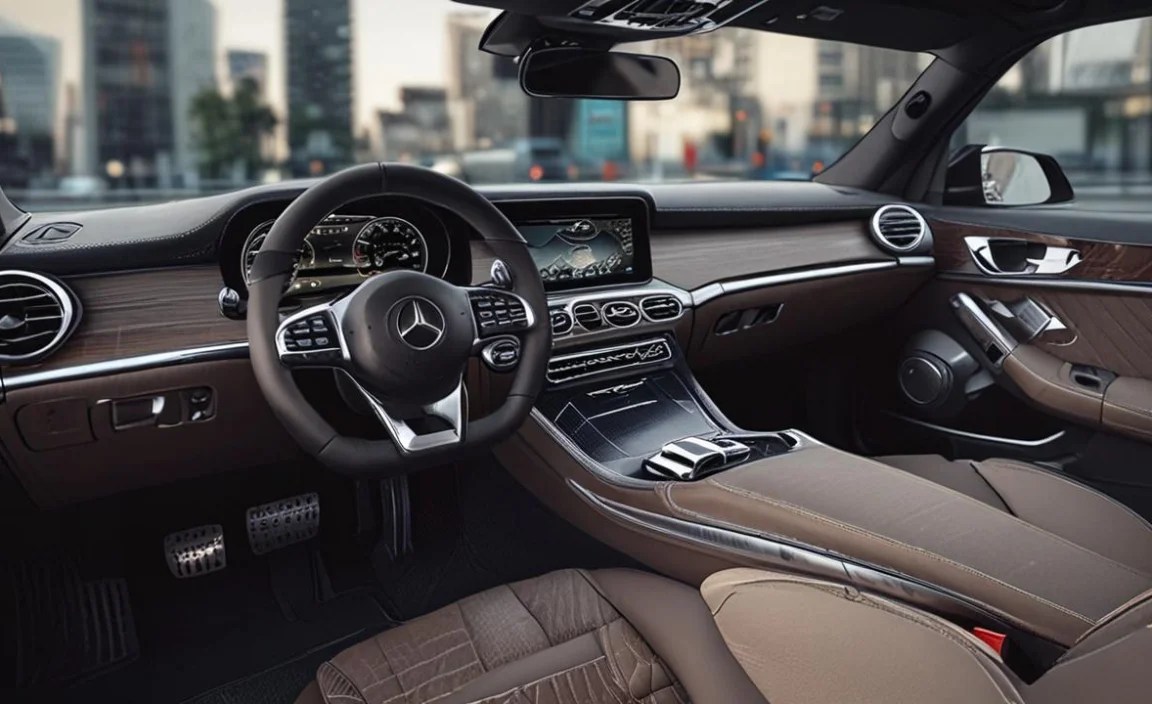
Beyond basic customization, the Virtual Cockpit and MBUX system offer a wealth of advanced features that enhance your driving experience and connectivity.
Augmented Reality Navigation (AR)
If your Mercedes SUV is equipped with this cutting-edge feature, your Virtual Cockpit (or the central screen) can overlay real-time video from the front camera onto the navigation display. This means graphical arrows indicating turns, street names, and even building numbers are superimposed directly onto the live road view. It makes navigation incredibly intuitive, virtually eliminating the possibility of missing a turn. To activate AR navigation, you typically select it as your primary navigation view within the MBUX system.
Driver Assistance Systems Visualization
The Virtual Cockpit provides a sophisticated visual representation of the car’s driver assistance systems. You can see:
- Adaptive Cruise Control (ACC): Visuals show the set speed and distance to the vehicle ahead.
- Lane Keeping Assist: Graphics demonstrate your car staying within lane markings.
- Traffic Sign Assist: Displays detected speed limits and other road signs.
- Blind Spot Assist: Alerts you to vehicles in your blind spots.
This visual feedback builds trust and understanding of how these advanced safety features are working to protect you. For a deeper dive into Mercedes-Benz’s innovative safety technology, the official Mercedes-Benz research and development pages offer excellent insights into the engineering behind these systems.
Performance Data and Diagnostics
For those who appreciate the engineering marvel under the hood, the Virtual Cockpit can display a range of performance-related data. This can include:
- Engine RPM and power output
- Torque application
- Acceleration figures (0-60 mph, etc.)
- Oil temperature and pressure (on performance models)
- Tire pressure monitoring system (TPMS) data
This information is often grouped into specialized “Sport” or “AMG” display modes, giving performance enthusiasts the data they crave in a clear, dynamic format. Understanding your vehicle’s vitals can also be a first step in diagnosing minor issues– for example, seeing a warning light here is your car’s direct communication.
Connectivity and Media Integration
The Virtual Cockpit seamlessly integrates with your smartphone and media devices. You can see:
- Current song playing, artist, and album art
- Track controls (play, pause, skip)
- Phone call information (caller ID, recent calls)
- Navigation prompts even when using a different infotainment screen
This integration reduces the need to constantly switch between different displays, keeping your focus where it needs to be.
Models Equipped with the Virtual Cockpit

The Virtual Cockpit, powered by the MBUX system, is a standard or optional feature across a wide range of Mercedes-Benz SUV models. Its availability can vary based on the specific trim level, model year, and optional packages chosen. However, you’ll find it prominently featured in models such as:
| Mercedes-Benz SUV Model | Typical Availability |
|---|---|
| Mercedes-Benz GLA | Optional on most trims, often part of a package. |
| Mercedes-Benz GLB | Optional on most trims, particularly higher-end ones. |
| Mercedes-Benz GLC | Standard on many newer trims, optional on others. |
| Mercedes-Benz GLE | Standard on most recent models within the lineup. |
| Mercedes-Benz GLS | A signature feature, typically standard on this flagship SUV. |
| Mercedes-Benz G-Class | Integrated into its unique, modern interior for newer generations. |
| Mercedes-AMG Variants (e.g., AMG GLA 45, AMG GLC 43, AMG GLE 63) | Often standard, with exclusive AMG-themed layouts available. |
When comparing models or considering options packages, always check the specific configuration for the vehicle you’re interested in. The Virtual Cockpit is a significant upgrade that enhances both the usability and the premium feel of any Mercedes SUV. It’s part of what makes the Mercedes-Benz ownership experience so advanced and enjoyable.
Common Questions About the Mercedes SUV Virtual Cockpit
Q1: How do I turn the Virtual Cockpit on and off?
A1: The Virtual Cockpit is an integrated part of your vehicle’s electrical system and MBUX infotainment. It turns on automatically when you start the car and turns off when you switch off the engine. There isn’t a separate on/off switch for the display itself.
Q2: Can I change the size of the speedometer or tachometer?
A2: While you can’t fundamentally change the size of the core dial graphics in all display modes, you can choose display styles where other information is minimized, effectively making the dials appear larger. You can also switch to modes like “Navigation” where the map takes prominence, and essential driving data is presented more compactly.
Q3: Is the Virtual Cockpit difficult to learn?
A3: Mercedes-Benz designed the MBUX system and the Virtual Cockpit for intuitive use. With the steering wheel controls, you can learn to navigate most functions within a few drives. Voice commands make many operations even simpler.
Q4: What happens if the Virtual Cockpit screen is dirty?
A4: Use a soft, lint-free microfiber cloth to clean the screen. For stubborn smudges, you can lightly dampen the cloth with a screen cleaner specifically designed for automotive displays or a mixture of water and mild soap. Avoid abrasive materials or harsh chemicals that could damage the screen coating.
Q5: How does the Virtual Cockpit impact fuel efficiency or battery life (for hybrids/EVs)?
A5: The power consumption of the digital display is managed efficiently by the vehicle’s systems. While it does consume energy, it’s optimized to minimize impact on fuel economy or electric range. In hybrid or electric models, the display also shows crucial energy flow and charging information, which can help drivers optimize their driving for efficiency.


