
Mercedes-Benz Haptic Feedback Controls: Ultimate Touch Experience
Quick Summary: Mercedes-Benz haptic feedback controls enhance your driving experience with tactile responses from touchscreens, making interactions more intuitive and safer. This technology provides a distinct “click” feeling under your fingertip, confirming inputs and reducing the need to constantly look at the display.
As a Mercedes-Benz owner, you appreciate innovation and luxury. One of the most seamless technological advancements you might encounter is the haptic feedback integrated into the touch controls. These aren’t just fancy touchscreens; they’re designed to give you a physical sensation, a subtle “click” or vibration, right under your fingertip when you make a selection. This is a game-changer for interacting with your car’s infotainment and vehicle settings, making the experience more intuitive and less distracting. Let’s dive into how this sophisticated technology works and how it elevates your Mercedes-Benz ownership.
Understanding Mercedes-Benz Haptic Feedback Controls

Haptic feedback, in essence, is technology that recreates the sense of touch by applying forces, vibrations, or motion to the user. When you interact with a haptic-enabled screen in your Mercedes-Benz, you’ll feel a distinct physical response that mimics the feel of pressing a physical button. This technology has been thoughtfully integrated into various Mercedes-Benz models, transforming how you control everything from climate settings and navigation to media playback.
Think of it this way: when you tap a button on your smartphone and feel a slight rumble, that’s haptic feedback. Mercedes-Benz takes this a step further by calibrating it for precision and nuance within the vehicle. This adds a layer of confidence to your interactions, letting you know your command has been registered without you needing to take your eyes off the road for too long.
The Technology Behind the Feel
The magic behind Mercedes-Benz haptic feedback controls lies in a combination of small, precisely controlled actuators embedded beneath the touchscreen surface. When you touch a specific point on the screen, these actuators engage to create a localized vibration or resistance that your fingertip perceives. This is not a one-size-fits-all vibration; the system can be programmed to deliver different types of feedback for various functions.
For example, a quick tap on a menu icon might yield a brief, sharp pulse, while sliding a control like a volume slider might produce a continuous, subtle vibration that changes in intensity as you move your finger. This nuanced feedback is a hallmark of Mercedes-Benz engineering, ensuring the technology feels natural and responsive. The goal is to bridge the gap between physical buttons and flat touchscreens, offering the best of both worlds: the sleekness of modern design with the reassuring tactility of traditional controls.
Benefits of Haptic Feedback in Your Mercedes
The integration of haptic feedback in Mercedes-Benz vehicles offers several significant advantages for drivers:
- Enhanced Safety: By providing tactile confirmation, drivers can keep their eyes on the road more often, reducing the distraction associated with visually searching for and confirming button presses on a touchscreen.
- Intuitive Operation: The physical response makes interacting with the infotainment system feel more natural and less like operating a generic tablet. It builds confidence that your selection has been accurately registered.
- Improved User Experience: This technology adds a premium feel to the interior, elevating the overall luxury and sophistication of the driving environment.
- Reduced Errors: The clear tactile feedback minimizes accidental selections, ensuring you activate the intended function.
- Accessibility: For some drivers, the added sensory input can be beneficial in confirming interactions, even in challenging driving conditions or with less than ideal lighting.
Mercedes-Benz is committed to driver-centric innovation, and haptic feedback is a prime example of how technology can directly contribute to a safer and more enjoyable driving experience. It’s about making complex systems feel simple and intuitive through intelligent design.
How to Use Mercedes-Benz Haptic Feedback Controls

Using haptic feedback controls in your Mercedes-Benz is remarkably straightforward, as the system is designed to be as intuitive as possible. When you engage with any touch-sensitive surface that features haptic feedback, you’ll naturally feel the response. There’s no special technique required; simply touch the icons or controls on the display as you normally would.
The key is to pay attention to how the screen feels under your fingertip. A light press on a button should yield a distinct “click” or vibration. If you’re adjusting a slider, you might feel a continuous feedback that changes as you move the slider along its track. This immediate physical confirmation means you don’t need to visually verify every single input, allowing you to stay more focused on the road ahead.
Interacting with the MBUX System
The Mercedes-Benz User Experience (MBUX) system is where haptic feedback is most prominently featured. This advanced infotainment system is controlled through a combination of touchscreens, steering wheel controls, and voice commands. When using the central touchscreen or displays, the haptic feedback acts as your silent co-pilot, confirming your actions.
Here’s a general guide to interacting with MBUX elements that offer haptic feedback:
- Tapping Icons: When you tap an icon for an application, setting, or menu, you’ll feel a brief, distinct tactile pulse. This confirms that the system has registered your tap.
- Adjusting Sliders: For controls like volume, seat temperature, or screen brightness that use sliders, you’ll often feel a continuous, subtle vibration as you drag your finger. This feedback can help you make precise adjustments without needing to glance at the screen.
- Pressing Buttons: Virtual buttons within the MBUX interface will provide a tactile “click” upon activation, simulating the feel of a physical button.
- Navigating Menus: As you swipe through menus or select items, the haptic feedback will confirm each successful action, ensuring a smooth and responsive navigation experience.
It’s worth noting that the intensity and nature of the haptic feedback can sometimes be customized within the MBUX settings, allowing you to tailor the experience to your personal preference. You can typically find these options under “Display,” “Sound & Haptics,” or similar menu categories.
Steering Wheel Controls and Haptics
Mercedes-Benz has also ingeniously incorporated haptic feedback into its steering wheels, especially on newer models. The touch-sensitive pads on the steering wheel, used for navigating menus on the instrument cluster and controlling the MBUX system, provide tactile feedback to confirm your swipes and presses.
When you swipe left or right on a steering wheel control pad, you’ll feel a subtle click or a change in resistance. Similarly, pressing down on the pad to select an item will also generate a tactile response. This is incredibly useful because the steering wheel controls are within immediate reach, and the haptic feedback allows for quick, confident adjustments without taking your hands off the wheel entirely or needing to look down.
This integration of haptics onto the steering wheel is a testament to Mercedes-Benz’s dedication to driver-focused design. It ensures that essential controls are not only accessible but also reassuringly responsive, enhancing control and reducing the need for distracting hand movements.
Mercedes-Benz Models Featuring Haptic Feedback Controls

Haptic feedback technology has been progressively rolled out across the Mercedes-Benz lineup, becoming a standard feature in many of its latest models. While the exact implementation can vary slightly between model years and specific trims, you’ll find this sophisticated touch experience in a wide range of vehicles embodying modern Mercedes-Benz innovation.
Here’s a look at some key models and series where you can expect to find advanced haptic feedback controls, particularly with the MBUX system:
Current Generation Models
If you’re looking at any of Mercedes-Benz’s current generation vehicles, especially those equipped with the MBUX infotainment system, haptic feedback is a likely feature. This includes:
- C-Class (W206 onwards): Features a prominent center touchscreen and touch-sensitive controls on the steering wheel with haptic feedback.
- E-Class (W213 facelift and W214): Expect advanced MBUX integration with haptic feedback on the central display and steering wheel.
- S-Class (W223 onwards): As the flagship sedan, the S-Class boasts the most advanced MBUX system, including sophisticated haptic feedback across its large displays and touch surfaces.
- GLE and GLS: These SUVs offer a luxurious interior experience with MBUX and the associated tactile feedback for controls.
- GLA and GLB: Even more compact models benefit from this technology, making everyday interactions more refined.
- EQ Models (EQS, EQE, EQC, EQA): Mercedes-Benz’s electric vehicle range heavily relies on advanced digital interfaces, and MBUX with haptic feedback is a core component of their futuristic cabins.
Performance-Oriented Models
Mercedes-AMG and Mercedes-Maybach vehicles also feature this technology, often with enhanced performance-oriented themes or exclusive interfaces within the MBUX system. The tactile feedback adds to the premium and technologically advanced driving environment that clients expect.
For the most precise information regarding haptic feedback in a specific Mercedes-Benz model and trim, it’s always best to consult the vehicle’s official specifications or owner’s manual. However, within the last few model years, it has become an increasingly prevalent and appreciated feature that defines the modern Mercedes-Benz interior.
Customizing Your Haptic Feedback Experience
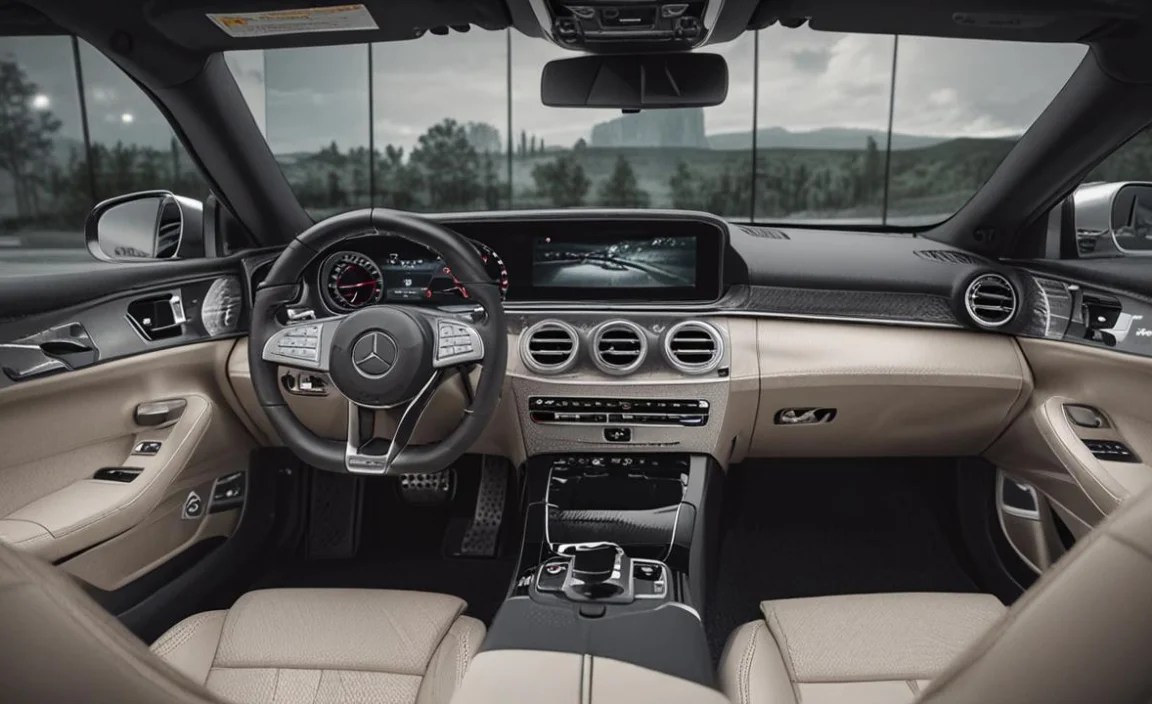
Mercedes-Benz understands that driver preferences can vary, and the company offers options to customize the haptic feedback experience to some extent. While you can’t fundamentally change how the technology works, you can often adjust its intensity or even disable it if you find it distracting (though most owners find it enhances usability).
The process for customization is typically found within the vehicle’s central infotainment system, specifically within the settings menus. Here’s where you might look:
Navigating the Settings Menu
1. Access the MBUX System: Start your vehicle and ensure the MBUX system is active.
2. Locate Settings: On the main screen or within the app menu, find the “Settings” icon (often represented by a gear or wrench).
3. Find Display or Sound & Haptics: Within the Settings menu, look for sub-menus like “Display,” “Screen,” “Personalization,” or “Sound & Haptics.” The exact naming can differ between models and MBUX versions.
4. Adjust Haptic Intensity: You should find an option related to “Haptic Feedback,” “Touch Feedback,” or “Vibration Intensity.” This might be presented as a slider allowing you to increase or decrease the strength of the feedback, or as preset levels (e.g., Low, Medium, High).
5. Enable/Disable: There will typically be a toggle switch to turn haptic feedback on or off entirely for the touch displays and/or steering wheel controls.
Tips for Customization
- Experiment with Intensity: Start with the default setting and then adjust it up or down to find what feels most comfortable and confirming to you. Some drivers prefer a subtle click, while others like a more pronounced vibration.
- Consider Driving Conditions: During spirited driving or on rough roads, you might prefer a slightly stronger haptic response to ensure your inputs are registered clearly.
- Steering Wheel vs. Touchscreen: Some systems allow independent adjustment of haptics for the steering wheel controls versus the main touchscreen. This can be useful if you find one more sensitive than the other.
By taking a few moments to explore these settings, you can fine-tune the haptic feedback to perfectly complement your driving style and personal preferences. This level of control ensures that the technology seamlessly integrates into your ownership experience.
Troubleshooting Common Haptic Feedback Issues

While Mercedes-Benz haptic feedback systems are generally robust and reliable, like any advanced technology, occasional issues can arise. Most problems are minor and can be resolved with simple troubleshooting steps. If you notice that the haptic feedback isn’t working as expected, here are some common points to check:
Checking Basic Settings
The most frequent reason for missing haptic feedback is that it has been inadvertently disabled in the vehicle’s settings. Always start by verifying the haptic feedback is enabled:
- Confirm Settings: Follow the steps outlined in the “Customizing Your Haptic Feedback Experience” section to ensure the feature is switched on and the intensity is set appropriately.
- System Restart: Sometimes, a simple restart of the MBUX system can resolve temporary glitches. This can often be done by turning the car off, opening and closing the driver’s door (which initiates a system shutdown for MBUX), and then restarting the vehicle.
Screen and Surface Sensitivity
The haptic feedback system relies on precise detection of touch. Issues with the screen surface can sometimes interfere:
- Clean the Screen: Ensure the touchscreen is clean and free from smudges, dirt, or debris. Oils and dirt can sometimes interfere with touch registration. Use a microfiber cloth designed for screens.
- Avoid Certain Screen Protectors: If you have applied an aftermarket screen protector, ensure it is compatible with haptic touch technology. Some thicker or poorly designed protectors can dampen or interfere with the tactile response.
- Check for Physical Damage: Inspect the screen for any cracks or damage that might affect its functionality.
Software Glitches
As with any complex software system, MBUX can occasionally encounter minor software glitches:
- Software Updates: Ensure your MBUX system is up-to-date. Mercedes-Benz frequently releases software updates that can fix bugs and improve performance. Your dealership can check for and install these updates. You can often check for over-the-air updates within the vehicle’s system settings under “Software Update.”
- Factory Reset (Use with Caution): In rare cases, a factory reset of the MBUX system might be necessary. This process will revert all system settings to their factory defaults, so be sure to back up any essential data or custom settings if possible. Consult your owner’s manual or a dealer before attempting a factory reset.
When to Seek Professional Help
If you’ve tried these basic troubleshooting steps and are still experiencing issues with haptic feedback, it’s best to contact your authorized Mercedes-Benz dealership or a qualified service center. There could be an underlying hardware issue with the touchscreen’s actuators or the related control modules that requires professional diagnosis and repair.
For further technical information and troubleshooting guides on MBUX, you can often refer to official Mercedes-Benz technical documentation or online forums dedicated to the brand, such as information found on https://www.mbusa.com/en/owners.
The Future of Haptic Feedback in Automotive Design
The integration of haptic feedback in Mercedes-Benz vehicles is more than just a luxury feature; it’s a significant step towards creating a more intuitive, safe, and engaging in-car experience. As automotive technology continues to evolve, we can expect haptic feedback to become even more sophisticated and widespread across the industry.
Looking ahead, several trends are likely to shape the future of haptic feedback in cars:
- Multi-Sensory Feedback: Imagine not just feeling a vibration, but also experiencing subtle changes in texture on a surface, or even localized temperature changes that correspond to the controls. This could lead to even more immersive interactions.
- Advanced Surface Integration: Haptic technology might be integrated more seamlessly into different materials beyond just glass screens. Think about haptic feedback embedded in dashboard trim, door panels, or even seat upholstery for controlling functions like seat adjustments or ambient lighting.
- Personalized Haptic Profiles: Future systems could allow for highly personalized haptic feedback profiles, adapting the tactile responses based on the driver’s profile, driving mode, or even their biometric data (e.g., stress levels).
- Enhanced Safety Features: Haptics could play a crucial role in advanced driver-assistance systems (ADAS). For instance, steering wheel haptics could provide more nuanced warnings for lane departure or proximity alerts.
- Virtual Button Replication: The aim will continue to be replicating the satisfying feel of physical buttons with even greater fidelity, offering the best of digital interfaces and tactile controls.
Mercedes-Benz is at the forefront of this innovation, continuously pushing the boundaries of what’s possible in luxury automotive technology. The current haptic feedback systems are a testament to their commitment to enhancing the driver’s connection with their vehicle, making every interaction more meaningful and secure. This journey towards a more tactile and intuitive interface is set to redefine the luxury car experience in the years to come.
Frequently Asked Questions (FAQ)
Here are answers to some common questions about Mercedes-Benz haptic feedback controls:
What exactly is haptic feedback in a Mercedes-Benz?
Haptic feedback in a Mercedes-Benz refers to the technology that provides a tactile sensation, such as a vibration or “click,” when you interact with touch-sensitive controls on screens or the steering wheel. It confirms your inputs and makes the interface feel more responsive and intuitive.
Do all Mercedes-Benz models have haptic feedback controls?
While haptic feedback is becoming increasingly common, it is primarily featured in models equipped with the MBUX infotainment system, especially those manufactured in recent model years. Newer models like the S-Class, C-Class, E-Class, and EQ range are more likely to have this feature.


