
Mercedes EQS Ambient Sound System: Effortless Luxury
The Mercedes EQS ambient sound system creates a truly immersive and luxurious driving experience, enhancing the already exceptional quietness of the electric sedan by offering personalized soundscapes and dynamic audio feedback that complements its advanced technology and refined interior.
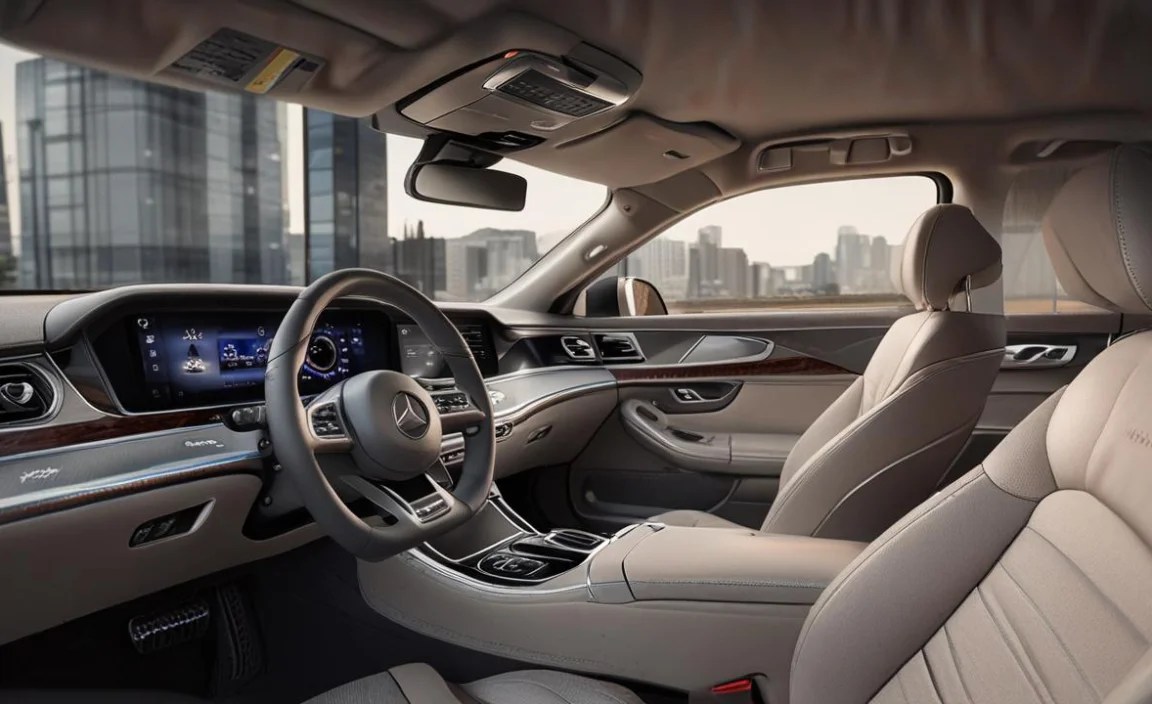
Driving a Mercedes-Benz EQS is an unparalleled experience in electric luxury. But did you know that the sound, or even the quiet, within your EQS can be tailored to suit your mood and driving style? This is thanks to the Mercedes EQS ambient sound system. It’s not just about playing music; it’s about crafting an auditory environment that elevates your journey. Many owners are curious about how this system works and how they can customize it to truly feel like effortless luxury. Let’s explore this fascinating feature and unlock its full potential for your daily drives.
Understanding the Mercedes EQS Ambient Sound System: More Than Just Music

The Mercedes EQS ambient sound system is a sophisticated piece of technology designed to enhance the driving experience beyond what traditional audio systems offer. It goes beyond simply playing your favorite songs. This system actively shapes the acoustic environment inside the cabin, using carefully designed sounds to complement the EQS’s silent electric powertrain and luxurious interior. It’s about creating a holistic sensory experience that contributes to both relaxation and driver engagement.
Think of it as a soundtrack to your drive, but one that is intelligently woven into the fabric of the vehicle itself. Whether you’re seeking a tranquil oasis on a busy commute or a more dynamic feel for spirited driving, the ambient sound system has something to offer. It’s a testament to Mercedes-Benz’s commitment to innovation and creating truly immersive luxury vehicles.
The Science Behind the Silence and Sound

Electric vehicles like the EQS are inherently quiet. While this is a major benefit, providing a serene cabin, it also means that other sounds – like road noise or wind noise – can become more noticeable. Mercedes-Benz has engineered extensive sound insulation and even uses the vehicle’s structure to minimize unwanted noise. However, the ambient sound system takes this a step further by intentionally adding sound.
This might seem counterintuitive. Why add sound to an already quiet car? The answer lies in psychoacoustics and driver feedback. Well-designed artificial sounds can:
- Mask unwanted noises: Gentle, pleasant sounds can cover up any minor intrusions of external noise, making the cabin feel even more isolated.
- Provide feedback: As you accelerate or decelerate, the system can emit subtle, synthesized sounds that give you a sense of the vehicle’s performance, mimicking the auditory cues of a traditional engine in a far more refined way.
- Enhance the driving feel: Different sound profiles can evoke different emotions, from calm and serene to energetic and sporty, allowing you to personalize the driving character of your EQS.
Mercedes-Benz uses advanced audio processing and high-quality speakers throughout the cabin to ensure these sounds are subtle, natural-feeling, and never intrusive. It’s a delicate balance, and the EQS ambient sound system strikes it beautifully.
Key Components of the EQS Ambient Sound System:

- Sound Generators: These are the sources that create the artificial sounds, often integrated into specific points of the vehicle.
- Audio System: The standard or optional Burmester® surround sound system plays a crucial role in delivering and distributing these sounds throughout the cabin.
- Control Unit/Software: Sophisticated algorithms process vehicle data (speed, acceleration, drive mode) to generate and modulate the soundscapes in real-time.
- User Interface: The MBUX (Mercedes-Benz User Experience) infotainment system provides the interface for drivers to select and customize their preferred sound settings.
Exploring the Sound Experiences: A Symphony of Options

The magic of the Mercedes EQS ambient sound system lies in its variety and customization. Mercedes-Benz offers distinct sound experiences, allowing drivers to match the cabin’s audio to their preferences and the driving situation. These are not crude engine noises; they are sophisticated, evolving soundscapes designed to enhance the driving experience.
You have the power to choose how your EQS sounds to you and, to some extent, how it feels to drive. This is where the “Effortless Luxury” truly comes to life – you’re not just being transported; you’re curating your personal auditory environment.
The Default Sound Settings

When you first get into your EQS, it comes with a default setting that is generally tuned for a serene and unobtrusive experience. This is often referred to as “balanced” or “programmatic” sound. It focuses on providing subtle auditory cues that enhance the feeling of electric driving without being overwhelming.
Even this default setting is a premium experience, designed to mask any minimal road noise and provide a gentle sense of responsiveness. It’s the perfect starting point for understanding what the system can do.
Mercedes-Benz’s Curated Sound Programs

Mercedes-Benz offers several distinct sound programs, each designed to evoke a specific mood or driving sensation. Here are some of the common ones you might find in the EQS:
- “Serene Breeze” (or similar calming name): This program focuses on light, airy sounds. It aims to create an exceptionally peaceful and relaxing cabin atmosphere, perfect for long journeys or when you want to de-stress. The sounds are very subtle, enhancing the feeling of gliding.
- “Silver Waves” (or similar): This option introduces a bit more character, often described as slightly more dynamic but still refined. It might offer more pronounced subtle tones as you accelerate, giving a gentle, futuristic feel.
- “Electric Nature” (or similar): This is typically the most engaging program. It provides clearer auditory feedback for acceleration and deceleration, giving a more pronounced sense of the vehicle’s performance. It’s designed for drivers who enjoy feeling more connected to the car’s power and dynamics, without the harshness of a combustion engine.
The terminology can vary slightly with software updates or regional specifications, but the core intent of offering these distinct sound profiles remains consistent. Each program is meticulously crafted to align with the luxury and technological prowess of the EQS.
Customization and Tonal Adjustments

Beyond selecting a preset program, the EQS often allows for further personalization. You can usually fine-tune the intensity or “volume” of the ambient sound, adjusting it to your personal preference. Some systems might even allow for minor tonal adjustments, giving you control over the character of the sound.
This level of customization is what truly differentiates the EQS’s system. It’s not a one-size-fits-all approach. You can tailor the auditory experience to match your mood on any given day.
How to Access and Control Your EQS Ambient Sound System

Navigating and controlling the ambient sound system is designed to be intuitive, leveraging the MBUX infotainment system. Most adjustments are made through the touchscreen interface. Here’s a general guide to how you’ll typically access these features.
Step-by-Step Guide to Customization

1. Access the MBUX System: Ensure your EQS is in Park (P) for safety. The main interface is controlled via the large central touchscreen, steering wheel controls, or voice commands.
2. Navigate to “My Vehicle”: On the main menu, look for an icon or option labeled “My Vehicle” or similar. This is where vehicle-specific settings reside.
3. Find “Sound Experience” or “Ambient Sound”: Within the “My Vehicle” settings, you should find an option related to sound. This might be directly called “Ambient Sound” or, more broadly, fall under “Sound Experience” or “Driving Sounds.”
4. Select Your Desired Program: You will likely see a list of the available sound programs (e.g., “Serene Breeze,” “Electric Nature”). Tap on the one that appeals to you.
5. Adjust Intensity: Once a program is selected, there will usually be a slider or numerical control to adjust the intensity or volume of the ambient sound. Move this to your preferred level.
6. Fine-Tuning (if available): Some models might offer additional options such as tonal adjustments or specific sound elements to toggle on or off. Explore these if they are present.
7. Saving Your Preferences: Your selections are typically saved automatically to your driver profile. This means the system will recall your preferred settings the next time you drive.
8. Voice Control: You can often activate settings via voice command. Try saying, “Hey Mercedes, activate Electric Nature sound program” or “Hey Mercedes, set ambient sound intensity to medium.”
It’s worth noting that the exact menu names and options can vary slightly depending on the specific model year and software version of your EQS. For the most precise instructions, always refer to your vehicle’s owner’s manual.
Tips for an Optimal Experience

- Experimentation is Key: Don’t be afraid to cycle through all the sound programs and intensity levels. What sounds best is subjective and can change based on your mood and driving conditions.
- Consider Your Passengers: While you control the sound, remember that passengers might have different preferences. Moderate intensity can be a good compromise.
- Combine with Music: The ambient sound system is designed to complement, not overpower, your music. When playing music, you might prefer a lower intensity for the ambient sounds, or even switch them off.
- Use “Sport” Mode for Engagement: If you want a more dynamic feel, try the “Electric Nature” program in conjunction with the car’s Sport drive mode.
- Quiet for Focus: If you truly want maximum quietness or are listening to a podcast, you can also choose to completely disable the ambient sound system through the MBUX menu.
Integration with Other EQS Features

The ambient sound system doesn’t operate in isolation. It’s an integral part of the EQS’s overall luxurious and technologically advanced experience, working in harmony with other key features.
The Burmester® High-End 3D Surround Sound System

While the ambient sound generator creates the sounds, it’s the exceptional Burmester® audio system that delivers them. This premium sound system, often standard or a highly sought-after option on the EQS, is key to the immersive experience. Its numerous speakers strategically placed throughout the cabin ensure that the ambient sounds, like music or calls, are rendered with incredible clarity and depth. When the ambient sound system is active, the Burmester® system subtly distributes these synthesized notes to create a cohesive and enveloping soundscape. The quality of the Burmester® plays a direct role in how authentic and pleasant the ambient sounds feel.
MBUX and Personalized Profiles

The Mercedes-Benz User Experience (MBUX) is the smart core of the EQS. It’s through MBUX that you access, control, and customize the ambient sound system. More importantly, these settings are tied to your personalized driver profiles. This means that each driver can set their preferred sound experience, and the EQS will automatically adjust when that driver’s profile is activated (via key, facial recognition, or login). This seamless integration ensures your personal haven is ready from the moment you get behind the wheel.
Driving Modes and Sound Dynamics

The ambient sound system intelligently reacts to the car’s selected driving mode (e.g., Comfort, Sport, Eco). In Sport mode, the sound might become more pronounced and responsive to acceleration, enhancing the feeling of performance. In Comfort mode, it will likely be more subdued and serene. This dynamic scaling ensures the audio environment always matches the intended driving experience.
Active Road Noise Compensation (ARNC)

The EQS is renowned for its acoustic comfort. This is partly achieved through advanced aerodynamic design and sound insulation. However, the ambient sound system works in tandem with features like Active Road Noise Compensation (ARNC). ARNC uses microphones to detect low-frequency noises from the road and actively counteracts them by emitting anti-phase sound waves through the speakers. The ambient sound system can layer its own pleasant tones over this, creating an unparalleled sense of quiet or a customizable sound environment that masks any residual noise.
Benefits of the Mercedes EQS Ambient Sound System

The ambient sound system is more than a novelty; it offers tangible benefits that enhance the ownership experience of the Mercedes EQS. It’s a carefully considered enhancement that aligns with the philosophy of effortless luxury and advanced technology.
Enhanced Acoustic Comfort

The primary benefit is the creation of an even more serene and isolated cabin environment. By introducing tailored sounds, the system effectively masks any minor external intrusions, allowing occupants to relax or concentrate better. This is crucial for a luxury vehicle aiming to provide a sanctuary.
Personalized Driving Experience

The ability to choose and adjust sound profiles lets drivers customize the very feel of their car. Whether you prefer a quiet, meditative space or a slightly more engaging auditory feedback, you have control. This personalization contributes significantly to the overall satisfaction and enjoyment of driving the EQS.
Improved Driver Engagement and Feedback

For drivers who appreciate the nuances of performance, the ambient sound system can provide subtle, non-intrusive feedback on acceleration and deceleration. This enhances the connection between the driver and the electric powertrain, offering a more engaging experience without resorting to artificial, aggressive engine notes. It’s a modern interpretation of performance feedback.
A Touch of Futuristic Luxury

The system contributes to the cutting-edge, futuristic ambiance of the EQS. The ability to shape the soundscape is a hallmark of advanced automotive technology, reinforcing the perception of the EQS as a leader in luxury electric mobility.
Reduced Driving Fatigue

A calm and pleasant acoustic environment can significantly reduce driver fatigue on long journeys. By minimizing stress from external noise and providing a soothing, personalized soundscape, the EQS helps drivers arrive at their destination feeling more refreshed.
Troubleshooting Common Issues

While the EQS ambient sound system is generally robust, like any advanced technology, occasional issues might arise. These are typically minor and can often be resolved with simple steps.
No Sound or Unexpected Silence

Possible Cause: Ambient sound is turned off or set to minimum intensity.
Solution: Navigate to the “My Vehicle” > “Sound Experience” (or similar) in the MBUX system and ensure the ambient sound is enabled and the intensity slider is not at the lowest setting.
Possible Cause: Muted via voice command or steering wheel control.
Solution: Check if the system has been accidentally muted. You can often unmute using voice commands like “Hey Mercedes, unmute sound” or by checking the audio controls on the steering wheel.
Sound is Too Loud or Intrusive

Possible Cause: Intensity set too high.
Solution: Lower the intensity slider in the MBUX “Sound Experience” menu to a more comfortable level.
Possible Cause: Selected program is too dynamic for your preference at this moment.
Solution: Switch to a different sound program (e.g., “Serene Breeze” instead of “Electric Nature”) or disable the system if preferred.
Sound Fades In and Out Unevenly

Possible Cause: Software glitch or interference.
Solution: Try restarting the MBUX system (if possible through a menu option for rebooting) or conduct a full vehicle power cycle (turn the car off, exit, lock it, wait a few minutes, then unlock and restart). If the problem persists, it may require a software update or a visit to a dealer.
Specific Sound Program Doesn’t Sound Right

Possible Cause: Software interpretation or a personal preference mismatch.
Solution: Try switching to another program. If a program consistently sounds off compared to how it should, ensure your MBUX system has the latest software updates installed. Dealers can check for these.
Integration with Music or Other Audio

Possible Cause: Ambient sound not designed to blend seamlessly with high-volume music.
Solution: The ambient sound system is often best enjoyed at moderate music volumes or when music is off. If you find it clashes, reduce its intensity or switch it off when listening to music, especially at higher volumes. Remember, it complements, not competes.
When to Contact Service
If you’ve tried the above troubleshooting steps and the issue persists, or if you notice any other unusual behavior with the sound system (e.g., crackling, distorted sounds, error messages), it’s recommended to contact your authorized Mercedes-Benz service center. They have the diagnostic tools and expertise to resolve more complex electronic or hardware-related issues.
| Sound Program Name (Example) | Primary Characteristics | Recommended Driving Scenario | Intensity Adjustment |
|---|---|---|---|
| Serene Breeze | Light, airy, very subtle, emphasizes quiet | Relaxed cruising, long journeys, intense focus | Can be adjusted for subtle background presence |
| Silver Waves | Slightly more dynamic, refined futuristic tones | Daily driving, balanced experience | Adjustable intensity to suit preference |
| Electric Nature | Clearer feedback, more prominent acceleration/deceleration tones | Sportier driving, when driver engagement is desired | Adjustable intensity, can be quite noticeable |
| OFF | No artificial sound generation | When pure silence or personal music is preferred | N/A |
Frequently Asked Questions (FAQ) about the Mercedes EQS Ambient Sound System
Q1:


