
CLE Class Lane Assist: Ultimate Driving Power
CLE Class Lane Assist: Ultimate Driving Power
The Mercedes-Benz CLE Class Lane Assist system is a sophisticated suite of driver-assistance technologies designed to help keep your vehicle centered within its lane. It uses cameras and sensors to monitor lane markings and can provide gentle steering input or alerts to prevent unintentional drifting. Understanding and utilizing this feature enhances safety and reduces driver fatigue on long journeys.
The open road beckons, and with it, the promise of effortless cruising. Yet, sometimes, the sheer concentration required on long drives can be draining. You might find your mind wandering, or perhaps just battling fatigue. This is precisely where the advanced technology in your Mercedes-Benz CLE Class steps in. Lane Assist is more than just a gimmick; it’s a guardian, a co-pilot that helps ensure you stay safely on track. If you’ve ever worried about drifting from your lane, or simply want to make your drives more relaxed, you’re in the right place. We’re about to demystify this crucial feature, breaking down exactly how it works and how you can leverage its power for a superior driving experience.
What is CLE Class Lane Assist?

The CLE Class Lane Assist system is a prime example of Mercedes-Benz’s commitment to intelligent driving. It’s part of a broader package of advanced driver-assistance systems (ADAS) designed to enhance safety and comfort. At its core, Lane Assist aims to prevent your vehicle from unintentionally drifting out of its current lane. This can happen for various reasons, from driver distraction to fatigue. The system intelligently uses a combination of hardware and software to monitor the road ahead and your vehicle’s position.
How Does it Work?
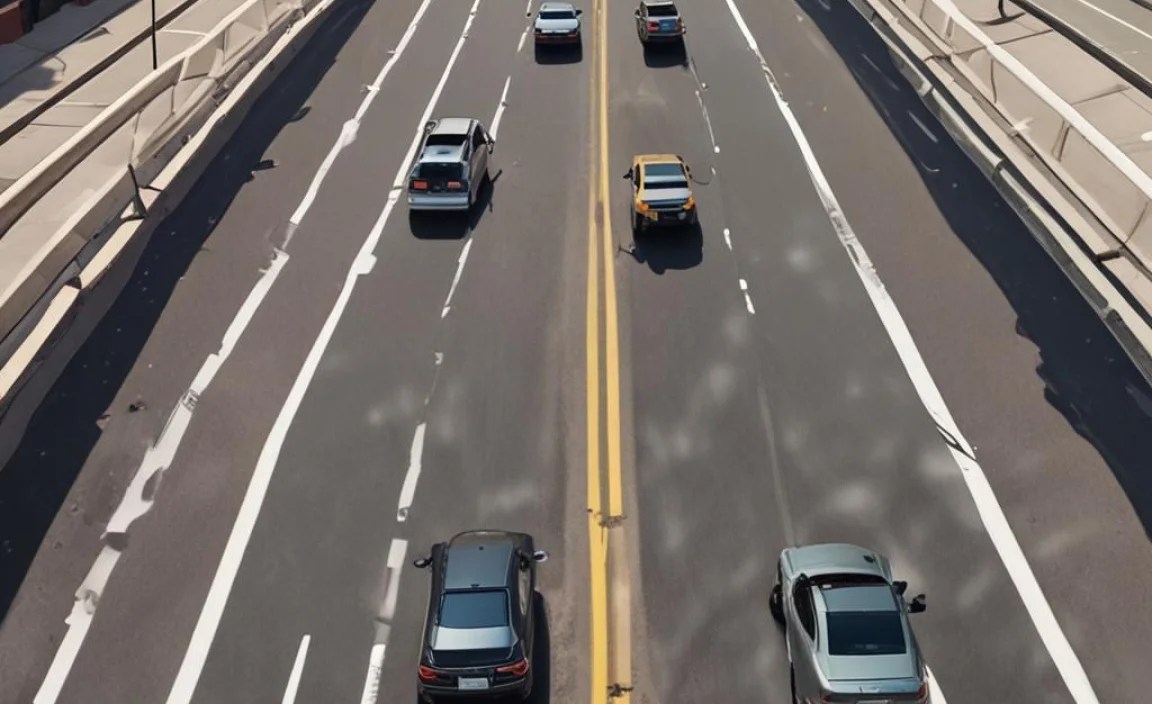
The magic behind CLE Class Lane Assist lies in its sophisticated sensors and intelligent algorithms. The system continuously scans the road through a camera, typically mounted near the rearview mirror. This camera is designed to recognize visible lane markings, whether they are solid white lines, dashed lines, or even other road edge indicators.
Here’s a more detailed breakdown of the process:
- Camera Monitoring: The forward-facing camera acts as the eyes of the system. It captures real-time video of the road ahead and uses image processing software to identify lane markings. The software is sophisticated enough to differentiate between different types of lines and adapt to various lighting and weather conditions.
- Lateral Control: Once lane markings are identified, the system calculates your vehicle’s position relative to these markings. It needs to know if you are centered, drifting towards the left line, or drifting towards the right line.
- Intervention: If the system detects that the vehicle is about to unintentionally cross a lane marking, it will intervene. This intervention typically takes two forms:
- Visual and Audible Warnings: The driver will first receive a warning. This usually appears as a visual alert on the instrument cluster or head-up display, often accompanied by an audible chime, indicating that the vehicle is deviating from its lane.
- Active Steering Correction: If the driver does not respond to the warning or if the drift is significant, the system can provide a gentle but firm nudge to the steering wheel, guiding the vehicle back towards the center of its lane. This is not an autonomous driving system; it’s designed to assist and correct, not to take over completely.
- System Limitations: It’s crucial to understand that Lane Assist relies on clearly visible lane markings. In situations where markings are faded, missing, obscured by snow or water, or on roads without clear markings, the system may not function correctly or may not be available. It also performs best on well-maintained roads with predictable curves.
Understanding the Components

The effectiveness of CLE Class Lane Assist is due to the integration of several key technological components:
Forward-Facing Camera
This is the primary sensor. Situated strategically on the windshield, usually behind the rearview mirror, this camera is a high-resolution unit capable of detecting lane markings under a wide range of conditions, from bright sunlight to twilight. It identifies both solid and broken lines, and in some versions, can even recognize road edges.
Electronic Power Steering (EPS)
The Lane Assist system works in conjunction with the vehicle’s EPS. When an intervention is deemed necessary, the EPS receives a signal to subtly adjust the steering angle, nudging the car back into its lane. This correction is designed to be noticeable enough to alert the driver but not so aggressive as to be startling.
Vehicle Speed Sensor
To ensure appropriate operation, Lane Assist uses data from the vehicle speed sensors. The system typically activates at certain speed thresholds, usually above highway speeds, as lane keeping is most critical during higher-speed driving. It may also disengage below a minimum speed to prevent unintended actions in slower traffic.
Actuators and Control Modules
Sophisticated control modules analyze the data from the camera and speed sensors. Based on predefined algorithms, these modules decide when and how to actuate the steering system. They manage the sensitivity and timing of interventions, ensuring a smooth and intuitive driving experience.
Key Features and Benefits

The CLE Class Lane Assist system offers significant advantages for drivers, enhancing both safety and comfort.
Enhanced Safety
- Accident Prevention: The most significant benefit is the reduction in the risk of accidents caused by lane departure. Unintentional lane departures are a common factor in many road fatalities.
- Driver Fatigue Mitigation: On long journeys, fatigue can impair a driver’s ability to maintain lane discipline. Lane Assist acts as a vigilant system, providing an extra layer of safety when concentration may wane.
- Protection on Curves: The system is particularly helpful on winding roads, aiding the driver in navigating curves smoothly and safely.
Improved Driving Comfort
- Reduced Driver Strain: By providing subtle assistance, the system can reduce the mental effort required to constantly monitor lane position, making long drives less tiring.
- More Relaxed Driving: Knowing that the system is actively helping to keep you centered can lead to a more relaxed and enjoyable driving experience.
Integration with Other Systems
Lane Assist often works synergistically with other advanced driver-assistance systems (ADAS) found in the CLE Class, such as Active Distance Assist DISTRONIC. This integration can provide a more comprehensive driving assistance experience, often referred to as semi-autonomous driving capabilities, though full autonomy is not yet achieved.
How to Activate and Use Lane Assist

Activating and using the Lane Assist feature in your CLE Class is straightforward, designed for ease of access and intuitive control. Most operations are managed through the vehicle’s infotainment system and steering wheel controls.
Accessing the Menu
You’ll typically find the Lane Assist settings within the vehicle’s main menu system. Navigate through the infotainment display to find the “Assistance” or “Driving Assistance” section. This is usually accessible via the central touchscreen or physical buttons on the center console.
Activation Procedure
- Locate Settings: On the infotainment screen, select the “Settings” or “Vehicle” icon.
- Find Assistance Systems: Navigate to the “Assistance” or “Driving Assistance” sub-menu.
- Select Lane Keeping Assist: Look for “Lane Keeping Assist” or a similar designation.
- Toggle On/Off: You will usually see a toggle switch or button to activate or deactivate the system. Ensure it is set to “On.”
- Adjust Sensitivity (Optional): Some models allow you to adjust the sensitivity of the lane departure warnings and steering interventions. You might be able to choose between early, medium, or late warnings/interventions.
Steering Wheel Controls
Many CLE Class models integrate quick access to Lane Assist functionalities via the steering wheel’s touch-sensitive controls. A dedicated button or a sequence of button presses might be used to toggle the system on or off, or to cycle through its different modes. Refer to your owner’s manual for the specific button layout and function on your model year.
Understanding Indicators
Once activated, you’ll see an indicator on your instrument cluster to confirm that Lane Assist is active and ready. This indicator might change color or display different icons to signify its status:
- Green Icon: Often indicates that the system is active and detecting lane markings correctly.
- Gray or White Icon: May signal that the system is active but not currently detecting markings, or is available but not engaged.
- Red Icon or Warning Light: Typically alerts you to a system malfunction or a situation where the system cannot operate (e.g., poor visibility of lane markings).
When the system detects an unintentional lane departure, you’ll receive a warning. This is usually a visual alert on the dashboard and/or an audible signal. If active steering intervention is engaged, you’ll feel a gentle force on the steering wheel guiding you back.
Lane Assist vs. Lane Centering Assist
It’s important to distinguish between Lane Assist and what some manufacturers call Lane Centering Assist or Active Lane Keeping Assist. While both systems are designed to keep you within your lane, they operate differently and offer varying levels of intervention.
Lane Assist, in its most basic form, is primarily a lane departure warning and prevention system. It alerts you when your vehicle is drifting out of its lane without signaling and can apply corrective steering to bring it back. The focus is on preventing unintentional drift across lane lines.
Lane Centering Assist, often integrated into more advanced adaptive cruise control systems, goes a step further. It not only warns and corrects but actively works to keep the vehicle centered within the lane markings, even on straights and gentle curves. This feature often works in conjunction with Active Distance Assist DISTRONIC, providing a more hands-off, but still attentive, driving experience.
The CLE Class often includes advanced versions of these systems. Depending on your specific package and model year, you might experience:
| Feature Name | Primary Function | Intervention Type | Typical Activation Speed |
|---|---|---|---|
| Lane Departure Warning (LDW) | Alerts when drifting from lane without signaling. | Visual and auditory warnings. | Operates at most speeds. |
| Lane Keep Assist (LKA) | Warns and actively steers to prevent unintentional lane crossing. | Warnings + subtle steering correction. | Typically above 37 mph (60 km/h). |
| Lane Centering Assist | Actively keeps the vehicle centered in its lane. | Continuous steering adjustment (when paired with adaptive cruise). | Typically operates with adaptive cruise control. |
Always consult your vehicle’s owner’s manual to precisely understand the capabilities and specific names of the lane assistance features in your CLE Class.
Best Practices and Limitations
To maximize the benefits of CLE Class Lane Assist and ensure safe operation, it’s essential to understand its best practices and inherent limitations.
When to Use It
- Long Highway Drives: This is where Lane Assist truly shines, reducing fatigue and enhancing safety on monotonous stretches of road.
- Well-Marked Roads: The system functions optimally on roads with clear, visible lane markings.
- When Feeling Fatigued: If you start to feel tired, activating Lane Assist can provide an extra layer of vigilance.
- In Conjunction with Driver Attention: Lane Assist is a driver-aid, not an autonomous system. Your full attention must remain on the road.
When Not to Use It (or Be Cautious)
- Poorly Marked Roads: On roads with faded, missing, or confusing lane markings, the system may not work reliably and could even provide incorrect warnings or corrections.
- Construction Zones: Temporary lane markings and unusual road configurations can confuse the system.
- Adverse Weather Conditions: Heavy rain, snow, fog, or bright sun glare can obscure lane markings and impair camera function.
- Sharp or Complex Curves: While capable of handling curves, extremely sharp or rapidly changing curves might challenge the system’s response time or accuracy.
- Merging and Exiting Traffic: The system might not always interpret complex traffic maneuvers accurately.
- When Lane Changes Are Necessary: Always use your turn signal when intentionally changing lanes. The system is designed to override if a signal is activated.
System Limitations to Be Aware Of
- Requires Visible Markings: The system’s effectiveness is entirely dependent on the clarity and presence of lane markings.
- Not an Autonomous Driving System: It does not drive the car for you. You are still responsible for steering, braking, accelerating, and monitoring the road.
- Potential for False Warnings: Sometimes, the system might interpret road features, shadows, or unusual markings as lane lines, leading to unnecessary alerts or corrections.
- Intermittent Availability: The icon on your dashboard will indicate when the system is available and functioning. If it’s unavailable, it means conditions prevent its operation. For more on driver-assistance systems, the National Highway Traffic Safety Administration (NHTSA) provides excellent safety resources.
Maintenance and Troubleshooting
Keeping your CLE Class Lane Assist system functioning optimally is straightforward and primarily involves ensuring its core components are clean and unobstructed.
Windshield Care
The forward-facing camera is mounted behind the windshield. Keep this area of the windshield clean. Dirt, smudges, ice, or damage (like cracks) in this specific area can interfere with the camera’s ability to accurately detect lane markings.
- Regular Cleaning: Use a high-quality glass cleaner and a soft cloth to clean the interior and exterior of the windshield, especially around the camera housing.
- Avoid Abrasive Cleaners: These can scratch the glass and obscure the view.
- Promptly Repair Cracks: Small chips or cracks near the camera can propagate and eventually require full windshield replacement. It’s best to get them repaired professionally as soon as they appear.
Sensor and Camera Obstructions
Ensure nothing is blocking the camera’s view. This includes:
- Aftermarket Window Tinting: Ensure any tinting applied to the windshield or surrounding windows doesn’t interfere with the camera’s operational field.
- Dashcams or Other Devices: Mounting devices directly in front of the camera can obstruct its view. Check your vehicle’s manual for recommended mounting locations.
- Snow, Ice, or Mud: In winter conditions or after off-roading, ensure the area is clear of debris.
Troubleshooting Common Issues
If your Lane Assist system isn’t working as expected, here are a few things to check:
- Check System Status: As mentioned earlier, your instrument cluster will usually display an icon indicating the system’s operational status. If it shows an error or is unavailable, consult the owner’s manual.
- Verify Activation: Double-check that the system is indeed activated in the vehicle’s settings. It’s easy to accidentally turn it off via steering wheel controls.
- Check Lane Markings: Are you on a road with clear lane markings? If not, the system is intended to be unavailable.
- Clean Windshield: If the windshield area near the camera is dirty or damaged, clean it or get it repaired.
- Restart the Vehicle: Sometimes, a simple vehicle restart can resolve temporary electronic glitches.
- Consult Your Owner’s Manual: It contains specific troubleshooting steps for your CLE Class model.
- Visit a Dealership: If the issue persists, it’s important to have your vehicle inspected by a qualified Mercedes-Benz technician. There might be a fault with the camera, steering module, or other related electronics.
FAQ About CLE Class Lane Assist
Is Lane Assist always on by default in the CLE Class?
No, Lane Assist is typically not active by default. You usually need to activate it manually through the infotainment system or a dedicated button on the


